01
Reads what you have
PDFs, scanned pages, Word, Excel, PowerPoint, text files and images. Scans are read with OCR, and slides keep their speaker notes.
Vault
Put a deal's, a client's or a project's documents in one private place. Your team asks questions in chat and every answer points to the page it used.
How it works
Give it a name and add the people who should see it. Nobody else can open it.
Drag in files or whole folders. Your folders stay the way you had them.
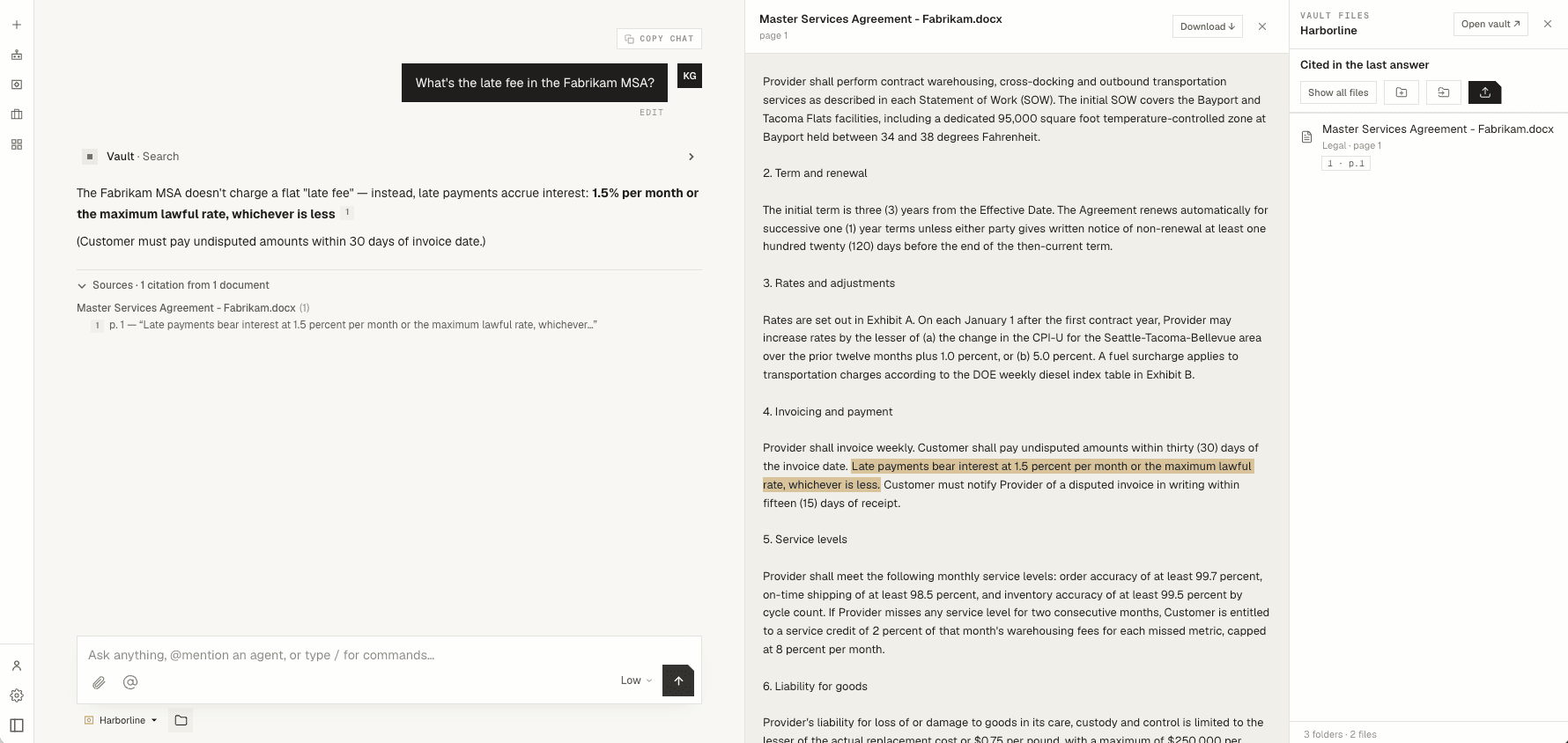
Pick the vault under the chat box and ask. You get an answer and the page it came from.
What it does
01
PDFs, scanned pages, Word, Excel, PowerPoint, text files and images. Scans are read with OCR, and slides keep their speaker notes.
02
Each answer cites the page it used. Click the citation and the document opens with that passage highlighted.
03
Upload a folder and its structure comes with it. Ask about one folder, like Legal, and it only looks there.
04
Documents open beside the chat, so you can check the answer without leaving the conversation.
05
Add people to a vault one at a time. Remove someone and they lose access right away.
06
Open Word, Excel, PowerPoint and PDF files in the onebee desktop app without downloading them.
Good for
Who can see it
A vault opens for the person who made it, the people they add and your organization's admins. Everyone else can't see that it exists.
Vault files don't show up in shared documents, company search, memory or anyone else's chat.
Your documents are used to answer your questions. They are not used to train models.
We'll set up a vault with your own files and show you.